Multilingual Pages Not Indexed: Fix International SEO and Hreflang Issues
Your translated pages exist but Google is not indexing them or is showing the wrong language version in the wrong country. Master hreflang implementation and international SEO to fix multilingual indexing.
In this guide
Expanding a website into multiple languages should multiply your search visibility across global markets. In theory, every translated page is a new opportunity to rank in a new language and reach a new audience. In practice, multilingual sites face some of the most complex indexing problems in SEO, and many translated pages never appear in Google search results.
The fundamental challenge is that Google must determine three things for every page on a multilingual site: what language is the page in, which country or region is it targeting, and how does it relate to equivalent pages in other languages on the same site. When Google gets any of these wrong, it can show the French version of your page to English searchers, index only one language version and treat the others as duplicates, or fail to index translated pages entirely because they appear to be duplicate content of the original language version.
Hreflang tags are the primary mechanism for communicating language and regional targeting to Google, and they are one of the most frequently misimplemented technical SEO elements on the web. Google's own guidelines describe hreflang as a "signal" rather than a "directive," meaning Google can and does override hreflang tags when it believes they are incorrect. A single error in your hreflang implementation can cause Google to ignore the entire hreflang tag set for a page, effectively leaving Google to guess which language version to show in which market.
Beyond hreflang, multilingual sites face domain structure decisions (subdomain vs subdirectory vs ccTLD), content quality challenges with machine translation, authority fragmentation when different languages live on different domains, and the complexity of managing sitemaps and Search Console properties across multiple language versions.
This guide provides a comprehensive troubleshooting approach for multilingual indexing problems, from hreflang audit and correction to domain structure optimization and translated content quality improvement.
Hreflang Implementation Errors That Prevent Indexing
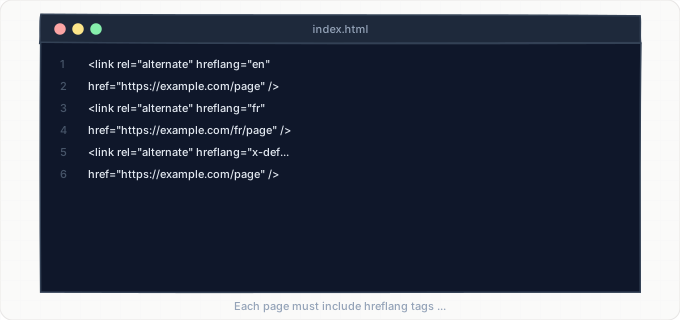
Hreflang tags tell Google which language and optional regional variant each page targets and where to find the equivalent pages in other languages. The implementation looks simple but is extraordinarily easy to get wrong, and errors cause Google to ignore the tags entirely for the affected pages.
The most common and most damaging error is missing self-referencing hreflang tags. Every page in a hreflang tag set must include a tag pointing to itself in addition to tags pointing to all other language versions. If the English version of a page has hreflang tags pointing to the French, German, and Spanish versions but does not include a tag pointing to itself, Google may discard the entire hreflang set for that page. This single omission, which occurs on an estimated 30% of multilingual sites, is the number one cause of hreflang-related indexing problems.
The second most common error is non-reciprocal hreflang references. If the English page points to the French page, the French page must also point back to the English page. If it does not (because the hreflang tags on the French page were not updated when the English page was added), the non-reciprocal relationship causes Google to treat the link as potentially erroneous and may ignore it. Every hreflang relationship must be bidirectional.
Language and region code errors are another frequent problem. Hreflang uses ISO 639-1 language codes ("en" for English, "fr" for French, "de" for German) and optionally ISO 3166-1 alpha-2 country codes ("en-US" for English-United States, "en-GB" for English-United Kingdom). Common mistakes include using three-letter language codes instead of two-letter codes, using incorrect country codes, using "en-UK" instead of the correct "en-GB," or mixing up language and country (using "us" as if it were a language).
URL errors in hreflang tags cause silent failures. If a hreflang tag points to a URL that returns a 404, redirects to a different URL, or is blocked by robots.txt, Google cannot validate the relationship and may ignore it. This commonly happens after a site migration when URLs change but hreflang tags are not updated. Always use absolute URLs in hreflang tags (starting with https://) rather than relative URLs.
The x-default hreflang value is often misunderstood. The x-default tag should point to the page shown to users when no specific language match is found. It is not a "default language" tag but rather a fallback for unmatched regions. A common mistake is omitting x-default entirely, which means users from regions not specifically targeted by any language version may see a random language version in search results.
Domain Structure and Its Impact on Multilingual Indexing
The domain structure you choose for your multilingual site has a significant impact on indexing performance, authority distribution, and Google's ability to understand your language targeting. The three main approaches each have distinct tradeoffs.
Country-code top-level domains (ccTLDs) like example.fr, example.de, and example.co.uk provide the strongest geographic targeting signal. Google inherently associates ccTLDs with their respective countries, and hreflang tags are less critical (though still recommended). The downside is that each ccTLD is treated as a separate domain with its own authority. A backlink to example.com does not help example.fr rank. Building authority separately for each ccTLD is expensive and time-consuming. For new multilingual sites, ccTLDs are often impractical unless you have significant marketing budgets for each market.
Subdomains (fr.example.com, de.example.com) provide moderate geographic separation. Google treats subdomains as semi-independent from the root domain, sharing some authority but not all. Subdomains can be targeted to specific countries using the International Targeting setting in Google Search Console. The advantage over ccTLDs is lower cost and simpler management. The disadvantage is that authority is partially fragmented, and each subdomain needs its own Search Console property and potentially its own sitemap.
Subdirectories (example.com/fr/, example.com/de/) keep all language versions under a single domain, fully consolidating authority. All backlinks to any language version strengthen the overall domain. Crawl budget is shared across all languages under one Search Console property. Subdirectories are the most popular approach for multilingual SEO and are recommended by most international SEO practitioners for sites that do not need strong country-specific domain presence.
From an indexing perspective, subdirectories are generally the easiest to manage. All pages share the same domain authority, which means translated pages benefit from the domain's existing crawl budget and ranking signals. With ccTLDs or subdomains, each language version must build enough authority independently to justify Google's crawl investment, which is why translated pages on separate domains or subdomains often take much longer to get indexed than those on subdirectories.
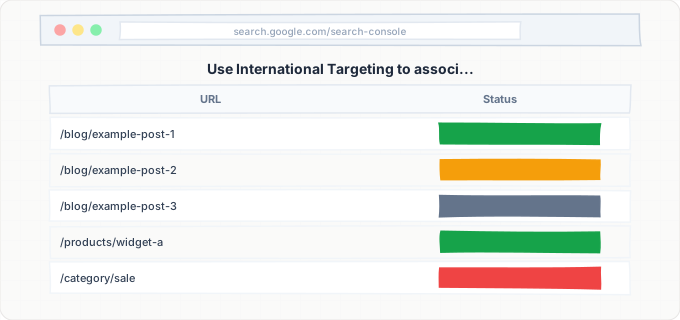
Regardless of structure, use the International Targeting feature in Google Search Console (available for subdomains and subdirectories) to associate each language section with its target country. For ccTLDs, this is automatic. For generic TLDs (.com, .org, .net), this setting is the only way to communicate country targeting beyond hreflang tags.
Machine Translation Quality and Content Uniqueness
Many multilingual sites use machine translation (Google Translate, DeepL, or similar tools) to create translated versions of their content. While machine translation has improved dramatically, using raw machine-translated content without human review creates indexing problems related to content quality.
Google has stated that it does not penalize machine-translated content per se, but it does evaluate content quality regardless of how it was produced. A machine-translated page that reads unnaturally, contains grammatical errors, produces nonsensical phrases, or mistranslates technical terminology may fail Google's quality evaluation and not be indexed. The quality bar is whether the content is genuinely helpful to a user who reads it in that language, not whether it was written by a human.
The more subtle problem is that machine-translated content is often not truly unique from Google's perspective. Google's algorithms can detect that a page is a translation of another page. If the translation does not add value beyond mechanical language conversion, Google may choose to index only the original language version and treat translations as derivative content. This is especially likely when the source and target languages are closely related (English to Dutch, Spanish to Portuguese) where much of the structure and many words are similar.
To improve the indexing rate of translated content, invest in human review of machine translations. A native speaker reviewing and improving machine-translated text catches errors, improves naturalness, and adds cultural context that makes the content genuinely valuable to the target audience. This hybrid approach (machine translation plus human editing) is significantly more cost-effective than full human translation while producing content quality that meets Google's indexing threshold.
For critical pages (homepage, main product pages, key service pages), consider full human translation with localization. Localization goes beyond word-for-word translation to adapt content for the target market's cultural context, examples, currency, measurements, and local references. Localized content is fundamentally different from the source content because it has been adapted rather than just translated, which eliminates any duplicate content concerns and provides the strongest indexing signal.
Avoid creating translated versions of thin pages. If a page has minimal content in the original language (a short blog post, a sparse product description), translating it creates an equally thin page in another language. Only translate pages that have enough substance to be index-worthy in both languages. A 200-word page does not become more valuable by being translated into five languages.
Hreflang Audit Checklist for Diagnosing Indexing Problems
A systematic hreflang audit can identify the specific errors causing your multilingual pages to not be indexed. Work through this checklist for a sample of your most important pages across all language versions.
First, verify hreflang tag presence. For each page, view the source and search for "hreflang." Hreflang tags can be implemented in three places: HTML link elements in the head section, HTTP response headers, or the XML sitemap. Most sites use HTML link elements. Confirm that hreflang tags exist on every language version of each page. If tags are present on the English version but missing on the French version, you have an implementation gap.
Second, verify self-referencing tags. On each page, confirm that one of the hreflang tags points to the page's own URL with the correct language-region code. This self-reference is mandatory. Every page must declare its own language in addition to referencing other versions.
Third, verify reciprocal references. For each pair of language versions, confirm that the references are bidirectional. If the English page references the French page, the French page must reference the English page. Non-reciprocal references are silently ignored by Google.
Fourth, validate language and region codes. Check every language-region code in your hreflang tags against the ISO standards. Common errors: "en-UK" should be "en-GB," three-letter codes like "eng" should be "en," and country-only codes like "us" without a language prefix are invalid.
Fifth, validate URLs. Click every URL in your hreflang tags. Each URL should return a 200 status code, should not redirect, and should not be blocked by robots.txt or noindex. URLs that redirect, return errors, or are blocked invalidate the hreflang reference.
Sixth, check for x-default. Confirm that each hreflang tag set includes an x-default entry pointing to the appropriate fallback page (usually the English version or a language selector page).
Seventh, check for consistency across implementation methods. If you implement hreflang in both HTML and sitemap, the two implementations must be identical. Conflicting hreflang references between HTML and sitemap confuse Google and may cause it to ignore both.
Document every error found during the audit. Prioritize fixes for errors affecting your highest-traffic pages and most important language markets. After fixing errors, resubmit affected URLs to Google through Search Console or IndexBolt for re-evaluation.
Regional Google Indexes and Market-Specific Indexing Challenges
Google operates separate indexes for different countries, and a page indexed in one country's Google may not appear in another country's Google, even if the language matches. Understanding regional indexing helps explain why your French pages appear in google.fr but not google.ca (where French-Canadian users search).
Google uses multiple signals to determine which country's search results should include a page: the hreflang country targeting, the domain's ccTLD, the server's geographic location (less important since CDN proliferation), the International Targeting setting in Search Console, and the backlinks pointing to the page (links from French sites signal French relevance, links from Canadian sites signal Canadian relevance).
A common problem is launching translated content with no market-specific authority signals. Your English site may have hundreds of backlinks from English-language websites, giving Google strong confidence that the English pages should appear in English-speaking markets. Your newly translated French pages have zero backlinks from French-language websites, giving Google no market-specific authority signal. Even with perfect hreflang implementation, Google may underindex your French pages because it lacks confidence in their relevance to the French market.
Building market-specific authority requires targeted effort. For each language market, build relationships with local industry publications, blogs, and directories. Create content that references local events, regulations, trends, and cultural touchpoints. Register the site with country-specific business directories and local search engines. Share content on social media platforms popular in the target market. These market-specific signals accelerate Google's willingness to index and rank your translated pages in their target markets.
For smaller or emerging markets, Google's crawl investment may be inherently lower. Google allocates crawl resources partly based on the size and activity of each country's web ecosystem. A page targeting a small market with limited web activity may take longer to be indexed than an identical page targeting a major market. For these smaller markets, direct submission through IndexBolt can compensate for Google's lower natural crawl rate.
Step-by-Step Guide
Run a Comprehensive Hreflang Audit
Use a site crawling tool that validates hreflang implementation to audit all hreflang tags across your site. The tool should check for self-referencing tags, reciprocal references, valid language-region codes, valid URLs, and consistency between HTML and sitemap implementations. Export the error report and categorize errors by type and severity. Missing self-referencing tags and non-reciprocal references are critical errors that must be fixed first. Invalid codes and URL errors are secondary priorities. Create a remediation plan that prioritizes fixing errors on your highest-traffic pages.
Fix Critical Hreflang Errors
Address the critical errors identified in your audit. Add self-referencing hreflang tags to every page that is missing them. Fix non-reciprocal references by updating the hreflang tags on pages that do not reference back to other language versions. Correct invalid language and region codes to match ISO standards. Update any hreflang URLs that redirect, return errors, or are blocked. If hreflang is implemented via sitemap, update the sitemap file. If implemented via HTML, update the template or CMS configuration. After fixes, re-crawl a sample of pages to verify the corrections are in place.
Verify Domain Structure and International Targeting
Confirm your Google Search Console properties are configured correctly for your multilingual setup. For subdirectory-based multilingual sites, use the International Targeting feature to associate each language directory with its target country. For subdomain-based sites, verify each subdomain separately and set International Targeting for each one. For ccTLD-based sites, verify each domain separately. Ensure each Search Console property has its own sitemap submitted containing only URLs for that language version. Check that no Search Console-level settings are conflicting with your hreflang implementation.
Evaluate Translated Content Quality
Have a native speaker review a sample of 10 to 20 translated pages in each language. The reviewer should assess whether the translation reads naturally, whether terminology is appropriate for the target market, whether cultural references make sense, and whether the content provides genuine value to a speaker of that language. Flag pages where translation quality is below acceptable standards. For critical pages, invest in professional human translation or localization. For bulk-translated content, implement a human review and editing workflow to improve machine translation output before publishing.
Submit Language-Specific Sitemaps
Create separate sitemaps for each language version of your site (or a single sitemap with hreflang annotations using the xhtml:link approach). Submit each sitemap to the appropriate Google Search Console property. Verify that sitemaps contain only valid, non-redirecting URLs for the correct language version. For sitemap-based hreflang implementation, ensure every URL entry includes hreflang link elements referencing all other language versions and itself. After submission, check the Sitemaps report to confirm Google successfully processed each sitemap.
Build Market-Specific Authority for Underindexed Languages
For language versions with particularly low indexing rates, assess whether the market-specific authority signals are sufficient. Check for backlinks from websites in the target language. Identify local directories, industry associations, and media publications where your site could be listed or referenced. Create content specifically relevant to the target market (local case studies, regional regulation guides, market-specific comparisons). Share translated content on social media platforms popular in the target region. Each market-specific signal helps Google confirm that your translated content is relevant to that market.
Submit Priority Translated Pages for Indexing
After fixing hreflang errors and improving content quality, submit your most important translated pages for indexing. Prioritize pages that target high-volume search queries in each language market and pages that are already indexed in the original language but not in translations. Use IndexBolt to submit translated page URLs in bulk across all languages simultaneously. Monitor indexing progress in each language-specific Search Console property. If specific languages consistently underperform, investigate whether there are language-specific quality or technical issues.
Common Issues & How to Fix Them
Google shows the wrong language version in search results for a specific country
Cause: Hreflang implementation is either missing, incorrectly configured, or being overridden by Google due to errors. Common causes include missing self-referencing hreflang tags, incorrect country codes (using "en-UK" instead of "en-GB"), non-reciprocal references between language versions, or the translated page being of significantly lower quality than the original, causing Google to prefer showing the original despite hreflang targeting.
Fix: Run a hreflang audit on the affected pages and fix all errors. Verify that the correct language version has a self-referencing hreflang tag and that all language versions reciprocally reference each other. Ensure the translated version has sufficient content quality to be considered index-worthy on its own. After fixes, use the URL Inspection tool to request re-crawling of both the correct and incorrect language versions so Google can process the updated hreflang signals.
Translated pages marked as 'Duplicate, Google chose different canonical' in Search Console
Cause: Google is treating the translated page as a duplicate of the original language version rather than as a distinct language alternative. This happens when hreflang tags are missing or broken, when the translation is too similar to the original (for closely related languages), or when canonical tags on the translated page incorrectly point to the original language URL instead of the translated URL.
Fix: Check canonical tags on the translated page. Each language version must have a self-referencing canonical tag pointing to its own URL, not to the original language URL. Fix hreflang tags to establish the language relationship correctly. If the languages are closely related and the translation is very similar to the original, add market-specific content to differentiate the pages (local examples, regional references, culturally adapted imagery). Ensure translated page URLs use a clear language identifier in the path (/fr/, /de/) or subdomain.
Only the primary language version is indexed despite having complete translations
Cause: Google is choosing to index only the original language version and treating all translations as duplicates. This typically indicates a fundamental hreflang implementation failure (tags are missing or invalid across the entire site), translations that are too similar to the original to be considered unique content, or insufficient authority and crawl budget for the translated sections of the site.
Fix: Validate hreflang implementation site-wide. If using subdirectory structure, confirm that the language directory pages have proper hreflang, canonical, and lang attribute settings. If using subdomains, verify each is independently registered in Search Console. Improve translation quality by adding human review and localization. Build internal links between translated pages to strengthen their crawl accessibility. Submit translated page sitemaps and request indexing for priority pages through IndexBolt.
Hreflang tags implemented correctly but not being respected by Google
Cause: Google treats hreflang as a signal, not a directive. Even with perfect implementation, Google may override hreflang if other signals contradict it. Common reasons for override: the page's actual content is in a different language than the hreflang declares (the page says it is French but the content is English), the translated page has a noindex tag, the translated page redirects to the original language version, or the translated page returns a 404 error.
Fix: Verify that the actual content on each page matches the language declared in its hreflang tag. Check that translated pages do not redirect to the original language version (some CMS auto-redirect based on browser language settings, which can redirect Googlebot to the wrong version). Ensure no noindex tags are applied to translated pages. Confirm that translated page URLs return 200 status codes. If all technical checks pass but Google still overrides hreflang, the content quality or market authority signals may be insufficient for Google to justify indexing the translated version.
Pro Tips
Your translated content represents a major investment in global reach. IndexBolt submits your multilingual pages directly to Google across all language markets, ensuring every translated page gets indexed in its target region. Submit your entire multilingual sitemap to IndexBolt and accelerate your global search visibility.
100 free credits. No credit card required. See results in under 24 hours.
Frequently Asked Questions
Does Google automatically detect the language of a page without hreflang tags?+
Yes, Google can detect the language of a page's content automatically using its language detection algorithms. However, automatic detection only determines the language, not the target country or region. Without hreflang tags, Google cannot distinguish between English content targeting the US, UK, Australia, or any other English-speaking market. Hreflang tags are essential for country-specific targeting and for explicitly telling Google about the relationships between translated versions of the same page. Without them, Google may show the wrong language version in the wrong market or treat translations as duplicates.
Is it better to use subdomains or subdirectories for multilingual sites?+
Subdirectories (example.com/fr/, example.com/de/) are generally recommended for multilingual SEO. They consolidate all domain authority under a single domain, share crawl budget across all languages, and are simpler to manage in Google Search Console. Subdomains (fr.example.com) partially fragment authority and require separate Search Console properties. ccTLDs (example.fr) provide the strongest country targeting but fully fragment authority and are the most expensive to manage. The exception is when your markets have distinct branding needs (different business names or brand identities in different countries), where ccTLDs or subdomains may be worth the authority tradeoff.
Can machine-translated content get indexed on Google?+
Machine-translated content can be indexed, but only if the translation quality is good enough to provide genuine value to readers in the target language. Google evaluates content quality regardless of how it was produced. Poor machine translations with grammatical errors, awkward phrasing, and mistranslated terminology may fail quality evaluation and not be indexed. For best results, use machine translation as a starting point and have native speakers review and edit the output before publishing. Raw machine translation of long-form content without human review is increasingly risky as Google's quality evaluation becomes more sophisticated.
How many language versions should I create before launching multilingual?+
Quality is more important than quantity. It is better to launch with two or three well-translated, properly implemented language versions than to launch with ten machine-translated versions riddled with errors. Start with your highest-priority markets based on existing traffic data (check Google Search Console for searches from different countries), revenue potential, and competitive landscape. Add additional languages one at a time, ensuring each new language is properly translated, has correct hreflang implementation, and is given time to get indexed before adding the next. Rushing to add many languages simultaneously increases the risk of implementation errors and dilutes your effort across too many markets.
Do I need to create separate social media and backlink profiles for each language?+
For optimal international SEO, yes. Google uses external signals to assess the relevance and authority of your content in each market. Backlinks from French-language websites signal that your French content is relevant to the French market. Social engagement from French users signals market-specific interest. While these signals are not required for indexing, they significantly improve Google's confidence in showing your translated content in the appropriate market's search results. At minimum, create local business listings and directory entries in each target market. For high-priority markets, invest in local content marketing, PR, and social media presence.